
Deduction Hunter
AI-surfaced deduction opportunities scored by confidence and dollar value.
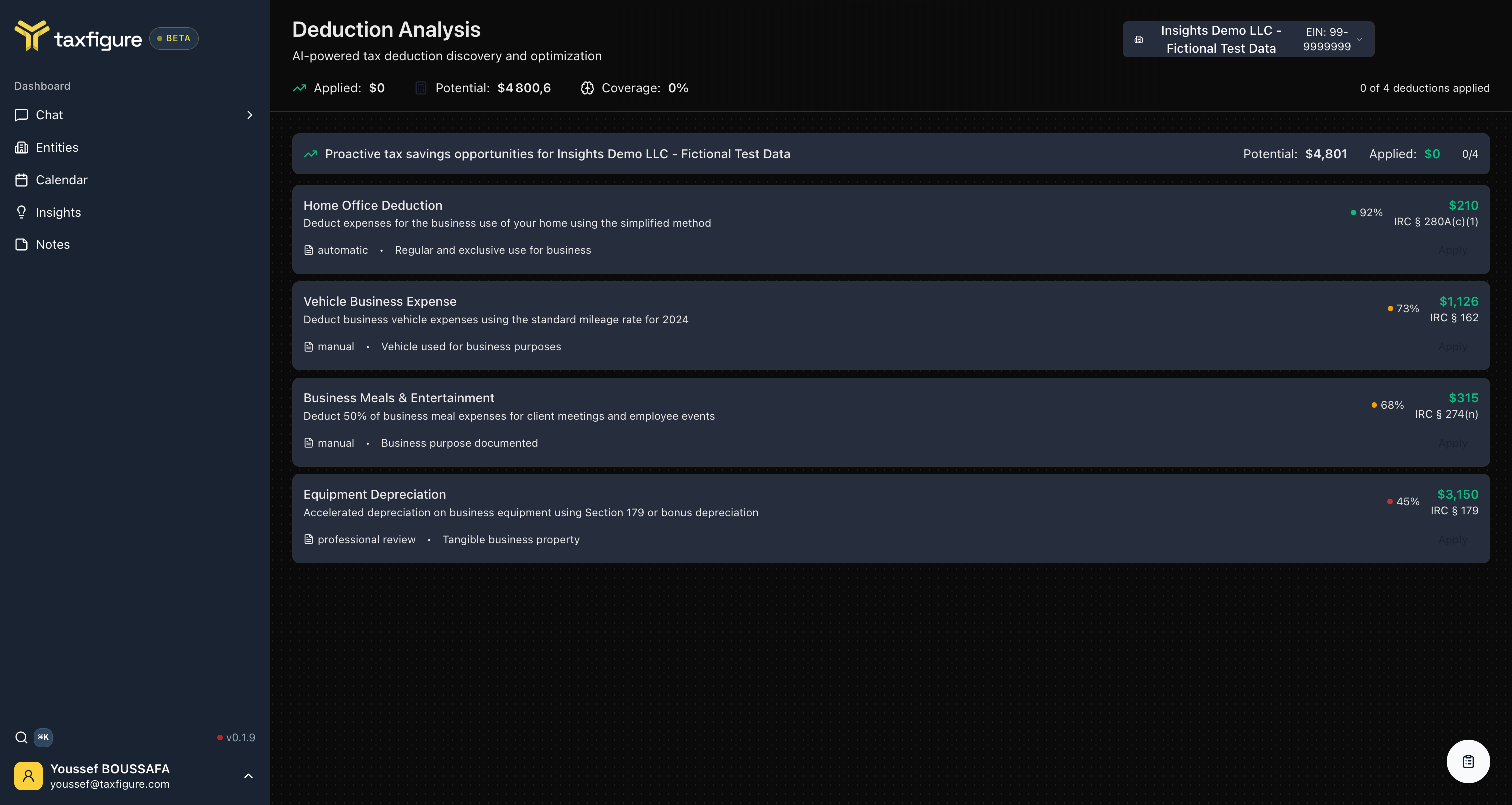
The Deduction Hunter scans an entity's documents and profile and surfaces deductions the client may be eligible for — ranked by confidence and estimated dollar value.
Open Deduction Hunter
From the entity workspace, open the Insights tab and pick the Deduction Hunter module. (You can also reach it directly at app.taxfigure.com/deduction-hunter and choose the entity from the picker.)
How the page is organized
At the top you'll see three numbers:
- Applied — dollar value of deductions you've marked as applied.
- Potential — dollar value of opportunities still on the table.
- Coverage — percentage of surfaced deductions you've applied.
Below that is the list of opportunities. Each card shows:
- Title — e.g. "Home Office Deduction", "Vehicle Business Expense".
- Description — what the deduction is.
- Confidence — how confident TaxFigure is that the client is eligible, expressed as a percentage.
- Estimated value — dollar amount of the deduction.
- IRC reference — the relevant Internal Revenue Code section.
- Type —
automatic(TaxFigure will apply it for you),manual(you need to confirm specifics), orprofessional review(a CPA should validate before applying).
Apply a deduction
Click Apply on a card to mark the deduction as taken for the current tax year. Applied deductions move from Potential to Applied and are reflected in the entity's Insights summary.
To undo, click the card again and pick Unapply from the menu.
Confidence scores
Confidence is the AI's estimate of eligibility, not a guarantee. A 92% home-office score, for example, means the model is highly confident the client meets the regular-and-exclusive-use test based on the facts in their documents — but the final judgment is still yours.
For high-stakes deductions (e.g. §179, accelerated depreciation), TaxFigure marks the card as professional review to remind you that a human should sign off before claiming.
Cite the source
Every deduction card links to the IRC section it's based on (e.g. "§ 280A(c)(1)" for home office). Click the citation to see the underlying rule and the documents TaxFigure used to score the opportunity.