
Insights
AI-powered document analysis and deduction discovery for each entity.
The Insights view turns an entity's uploaded documents into structured findings — what's in each document, what's missing, and what to act on next.
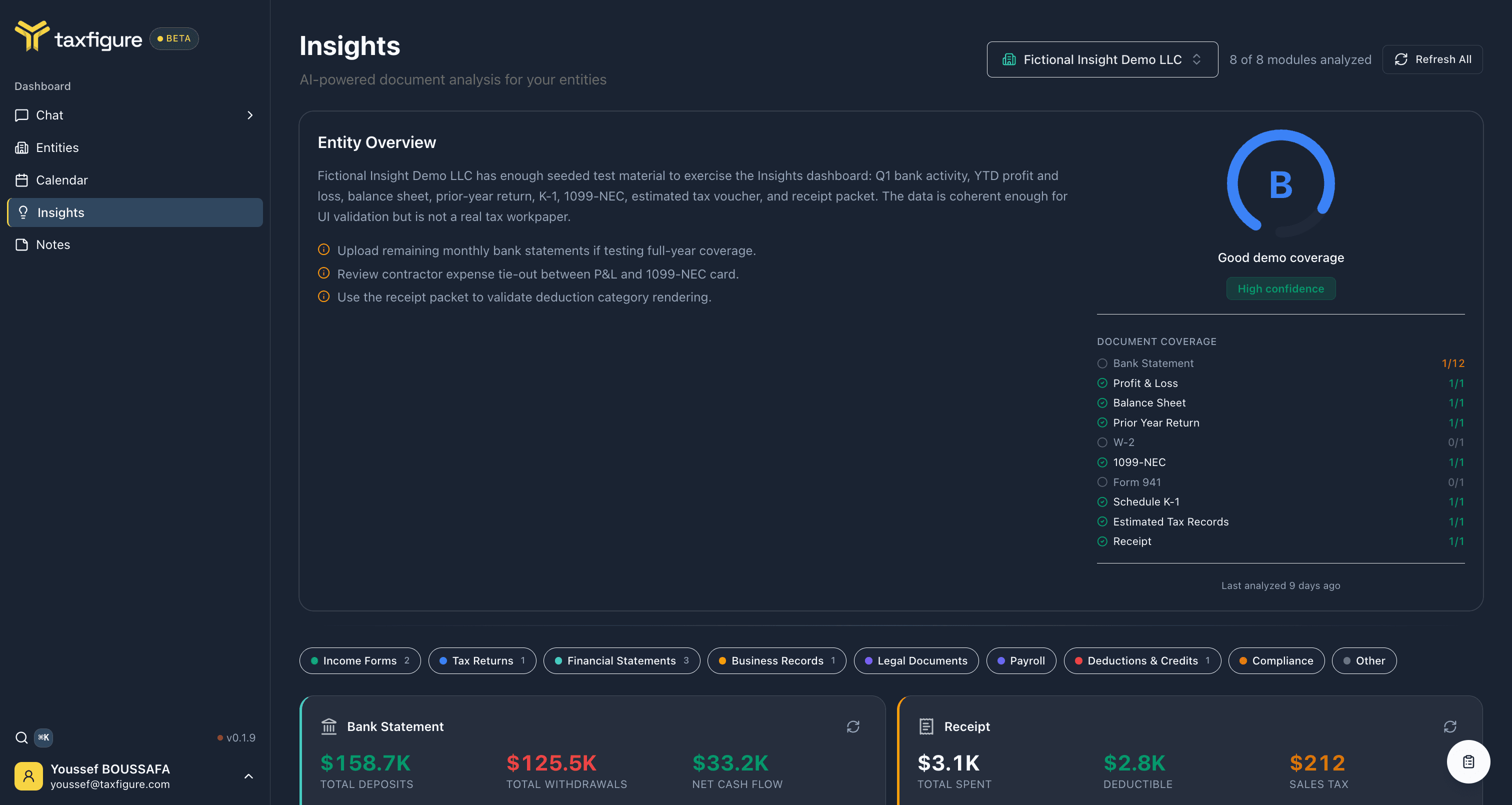
Open Insights
There are two ways in:
- Top nav → Insights — choose an entity from the picker to view its insights.
- Entity workspace → Chat → Insights tab — already scoped to that entity.
Entity Overview
The first card on the page is the Entity Overview. It gives you a read on the entity's data shape at a glance:
- Plain-language summary — what the uploaded documents tell us about the entity, and what's missing.
- Health grade (A–F) and a confidence label, based on how complete and consistent the uploaded set is.
- Document coverage matrix — for each document type the entity typically needs (Bank Statement, Profit & Loss, Balance Sheet, Prior Year Return, W-2, 1099-NEC, Form 941, Schedule K-1, Estimated Tax Records, Receipt, etc.), how many you've uploaded vs. how many are expected.
A short suggested next steps list under the summary points at the biggest gaps — e.g. "Upload remaining monthly bank statements" or "Review contractor expense tie-out between P&L and 1099-NEC."
Analysis modules
Below the overview, Insights renders one module per document type present on the entity. Each module is a structured read on what's in that document — much more than the raw scan.
Common modules you'll see:
- Bank Statement — total deposits, total withdrawals, net cash flow, monthly trend, recurring transactions, average balance.
- Profit & Loss — revenue by category, expenses by category, gross vs. net, year-over-year change, margin.
- Balance Sheet — total assets, liabilities, and equity with category breakdowns, plus the current ratio.
- Prior Year Return — return type (e.g. Form 1065), total income, taxable income, total tax, effective rate, and attached schedules.
- Receipt — total spent, deductible amount, sales tax, category breakdown, and the full vendor table.
- 1099-NEC — compensation, withholding, payer info.
- Estimated Tax Records — quarterly installments, AGI, taxable income, coverage percentage, effective rate.
- Schedule K-1 — partner-level income breakdown, capital account start/end, ownership percentage, distributions.
Each module has a Refresh button so you can re-run analysis on a single module after uploading or correcting that document — you don't need to refresh the whole page.
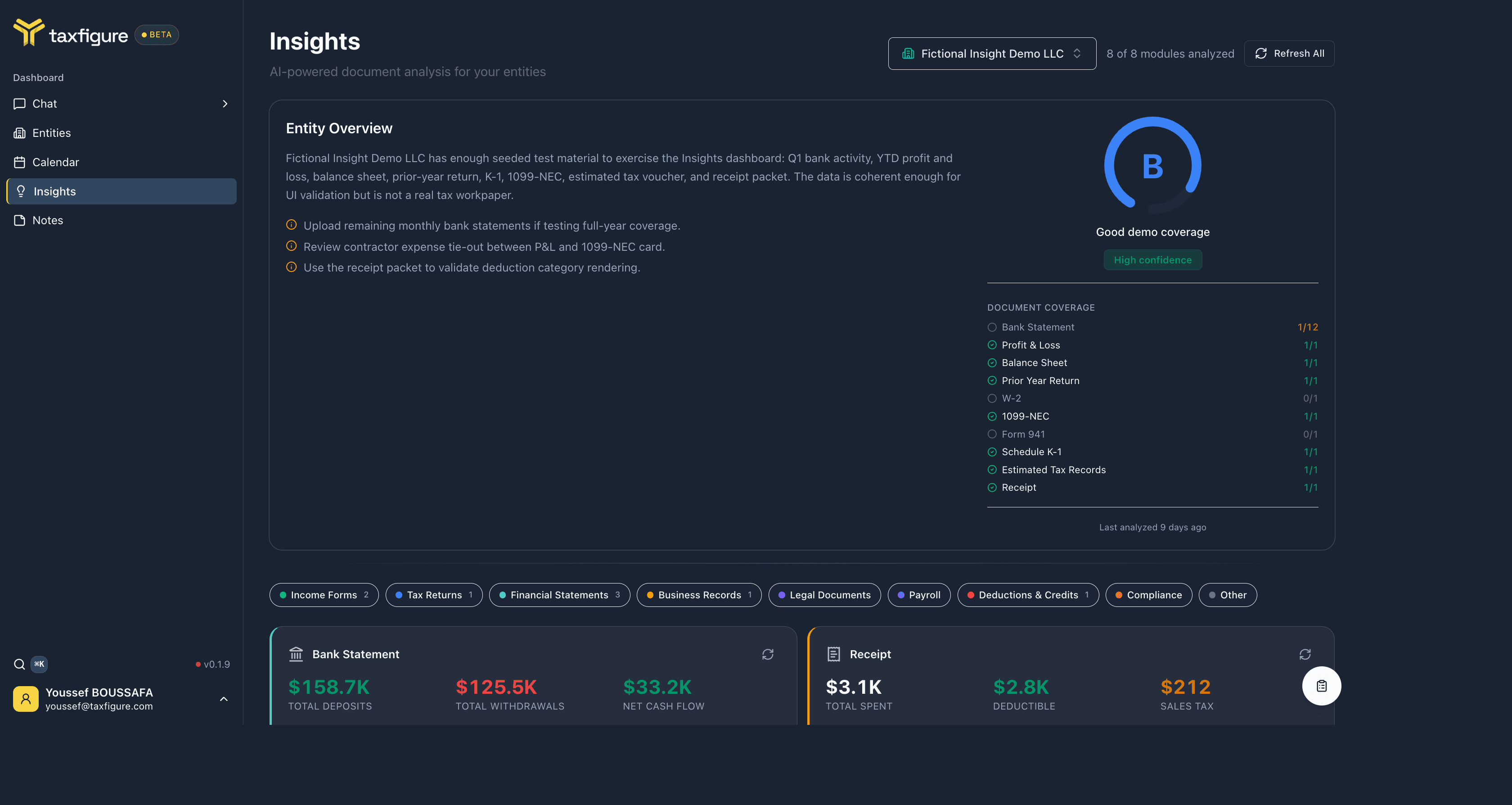
Category filters
A row of buttons across the top — Income Forms, Tax Returns, Financial Statements, Business Records, Legal Documents, Payroll, Deductions & Credits, Compliance, Other — filters the modules to the matching documents. The number next to each label is how many modules fall in that category.
Missing document types
Under the modules, Insights lists every document type the entity could have but hasn't uploaded. Use it as a working checklist when you're collecting source documents for a return.
Refresh insights
Insights regenerate automatically when you upload a new document or edit the entity profile. To force a refresh, click Refresh All at the top of the page, or Refresh on an individual module.